# 服务器配置类问题
- 请分析一个Group By语句的异常原因
- 如何比较系统运行配置和配置文件中的配置是否一致?
- 举几个MYSQL中的关建性能参数
分析一个 GroupBy 语句的异常原因
product_id category_id warehouse_id count 2030 9 1 10 2030 9 2 15 2030 9 3 20 2040 8 1 30 2040 8 2 20 select product_id,warehouse_id,sum(count)as cnt from stock group by product_id;知识点:SQL_MODE 的作用
配置MySQL处理SQL的方式
set [session/global/persist] sql_mode='xxxxxx
[mysqld] sqlmode=xxxxxx
SQL_MODE 说明 ONLY_FULL_GROUP_BY 对于GROUP BY聚合操作,如果出现在SELECT中的列、HAVING或者ORDER BY子句的非聚合列,没有在GROUP BY中出现,那么这个SQL语法检查报错。 ANSI QUOTES 禁止用双引号来引用字符串。 REAL_AS_FLOAT Real做为float的同义词 PIPES_AS_CONCAT 将 || 视为字符串的连接操作符而非或运算符 STRICT_TRANS_TABLES
STRICT_ALL_TABLES在事务存储引擎/所有存储引擎上启用严格模式出现,那么这个SQL语法检查报错。 ERROR_FOR_DIVISION_BY_ZERO 不允许0做为除数 NO_AUTO_CREATE_USER 在用户不存在时不允许grant语句自动建立用 NO_ZERO_IN_DATE
NO_ZERO_DATE日期数据内/日期数据不能含0 NO_ENGINE_SUBSTITUTION 当指定的存储引擎不可用时报错。 mysql> show variables like 'sql_model'; mysql> set session sql_mode='NO_ENGINE_SUBSTITUTION, only_full_group_by'; mysql> select product_id, warehouse_id, sum(count) as cnt from stock group by product_id; ERROR 1055 (42000): Expression #2 of SELECT list is not in GROUP BY clause and contains nonaggregated column ' stock. stock. warehouse_id' which is not functionally dependent on colum ns in GROUP BY clause; this is incompatible with sql_mode-only_ful1_group_by mysql> select product_id, warehouse_id, sum(count) as cnt from stock group by product_id, warehouse_id; mysql> select "this is a string"; mysql> set sql_mode="ansi_quotes, ONLY_FULL_GROUP_BY, NO_ENGINE_SUBSTITUTION"; mysql> select "this is a string"; ERROR 1054 (42S22): Unknown column 'this is a string' in 'field list' mysql> select 'this is a string'; mysql> create table t (id real); mysql> show create table t\G Table:t create Table:CREATE TABLE t (id double DEFAULT NULL)ENGINE-InnoDB DEFAULT CHARSET=utf8 mysql> set session sql_mode='real_as_float'; mysql> drop table t; mysql> create table;t(id real); mysql> show create table t\G Table:t create Table:CREATE TABLE t (id float DEFAULT NULL)ENGINE-InnoDB DEFAULT CHARSET=utf8 mysql> select 'hello' || 'mooc.com'; 0 1 row in set, 2 warnings mysql> show warnings; Truncated incorrect DOUBLE value: 'hello' Truncated incorrect DOUBLE value: 'imooc.com' mysql> select concat('hello', 'imooc.com'); hello imooc.com mysql> set session sql_mode='pipes_as_concat'; mysql> select 'hello' || 'mooc.com'; hello imooc.com mysql> create table t2(id int(11) default null); mysql> insert into t2('ansi'); 1 row affected, 1 warning mysql> show warnings; Incorrect integer value: 'ansi' for column 'id' at row 1 mysql> select * from t2\G id: 0 mysql> set sql_mode='strict_trans_tables'; mysql> insert into t2 values('ansi'); ERROR 1366 (HY000): Incorrect integer value: 'ansi' for column 'id' at row 1 mysql> set sql_mode=' strict_trans_tables,error_for_division_by_zero'; 0 rows affected, 1 warning mysql> select 1/0\G 1/0: NULL 1 row in sect, 1 warning mysql> show warnings; Division by 0 mysql> set sql_mode='ansi'; mysql> select 1/0\G 1/0: NULL
比较系统运行配置和配置文件中的配置
知识点
使用set命令配置动态参数
set [session | @@session.] system_var_name = expr
set [global | @@global.] system_var_name = expr
set [persist | @@persist.] system_var_name= expr
mysql> show variables like 'wait_timeout';
28800
mysql> set global wait_timeout=300;
mysql> show variables like 'wait_timeout';
28800
mysql> show global variables like 'wait_timeout';
300
mysql> show variables like 'max_connections%';
4000
mysql> set persist max_connections=1000;
mysql> show variables like 'max_connections%';
1000

$ ls /home/mysql/data/
... mysqld-auto.cnf ...
$ more mysqld-auto.cnf
{ "version" : 1, "mysql_server": { "max_connections": { "value" : "1000" , "Metadata": {"Timestamp" 1535290066405068, "user": "root" , "Host": "1ocalhost" }}}}
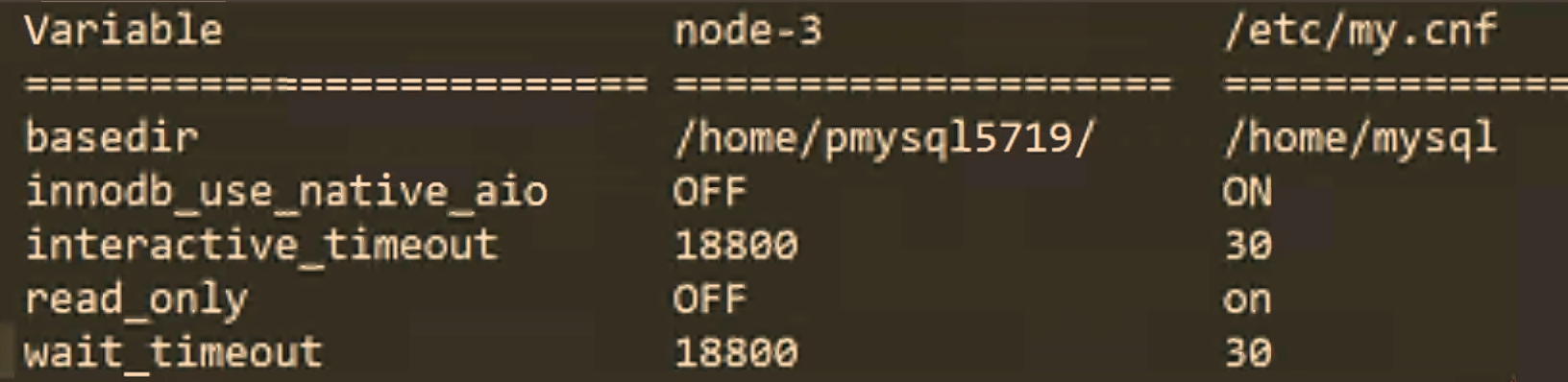
使用pt-config-diff工具比较配置文件
pt-config-diff u=root,p=,h=localhost /etc/my. cnf
举几个MySQL中的关键性能参数
知识点
常用的性能参数
参数 说明 服务器配置参数 max_connections 设置MySQL允许访问的最大连接数量 interactive_timeout 设置交互连接的timeout时间 wait_timeout 设置非交互连接的timeout时间 max_allowed_packet 控制MySQL可以接收的数据包的大小 sync_binlog 表示每写多少次缓冲会向磁盘同步一次binlog sort _buffer_size 设置每个会话使用的排序缓存区的大小 join_buffer_size 设置每个会话所使用的连接缓冲的大小 read_buffer_size 指定了当对一个MYISAM进行表扫描时所分配的读缓存池的大小 read_rnd_buffer_size 设置控制索引缓冲区的大小 binlog_cache_size 设置每个会话用于缓存未提交的事务缓存大小 存储引擎参数 innodb flush_log_at_trx_commit 0:每秒进行一次重做日志的磁盘刷新操作。
1:每次事务提交都会刷新事务日志到磁盘中。
2:每次事务提交写入系统缓存每秒向磁盘刷新一次innodb_buffer_pool_size 设置Innodb缓冲池的大小,应为系统可用内存的75%。 innodb_buffer_pool_instances Innodb缓冲池的实例个数,每个实例的大小为总缓冲池大小/实例个数。 innodb_file_per_table 设置每个表独立使用一个表空间文件